Currency and name
We filled in the currency from your country — check it. But give the budget a name of your own: that makes it easy to recognize on any of your devices.
 envelopes.
Personal budgeting. The envelope way.
Everyday spending. The bills ahead. Something to look forward to. Give the money you have a place in your plans.
Made for AndroidFree Windows companion
A little hands-on
There’s money in your account. But how much can you spend? Give an imaginary $2,000 a place in three envelopes. Then see what happens as life happens.
You have $2,000. Give each dollar a job.
Rent paid. Purchases recorded. Every envelope shows what you can still spend, without guessing from your bank balance.
See how it works in the app ↗The money in your envelopes is part of your total balance, not extra money.
Interactive example · not your real budget
02 / Same budget. The whole picture.
Your $2,000 story continues. Everything you recorded above is here: in your balance, transactions and reports.
What’s left and what you’ve spent, together at a glance.
Interactive illustration · data from your example
02 / Explore the app
From the first coffee to the next big goal. See the real app, with a sample budget.
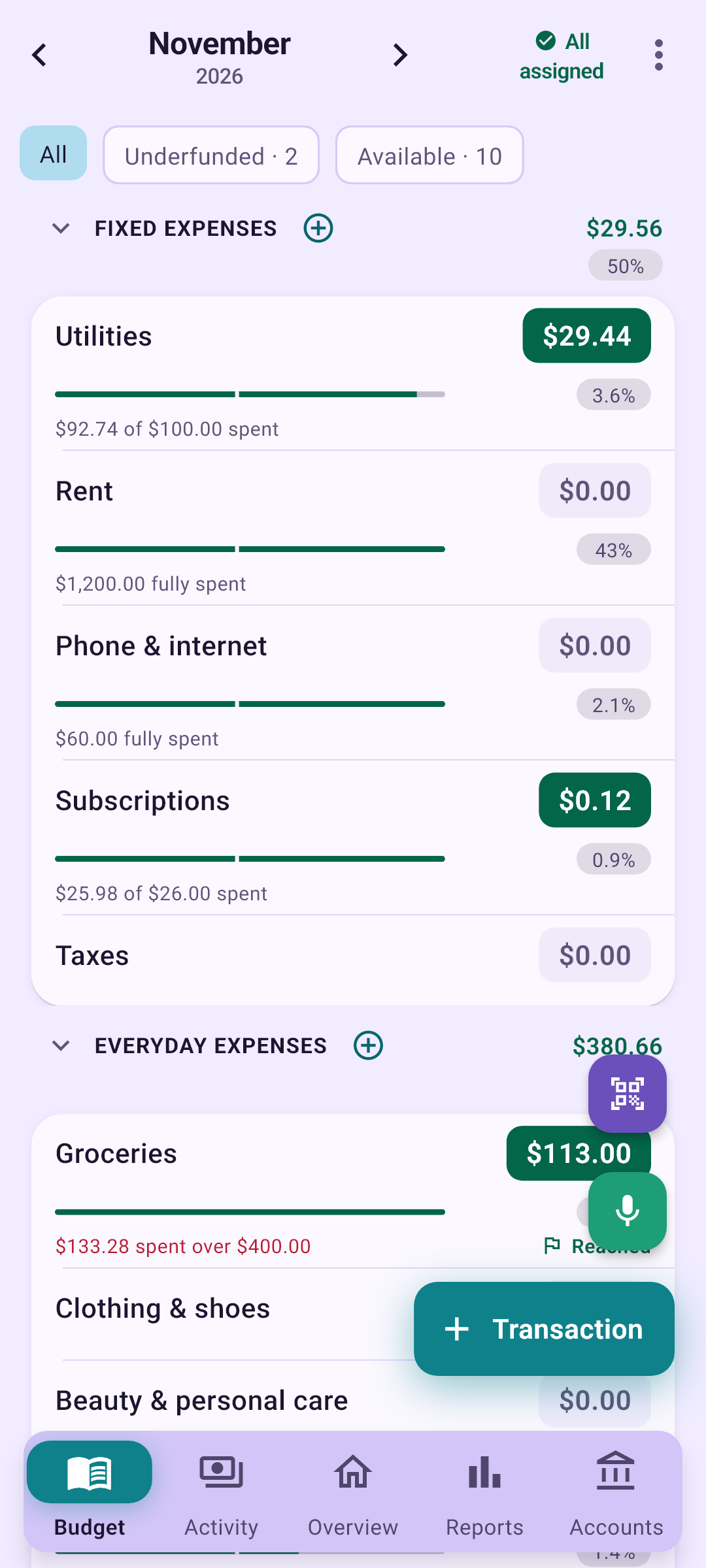
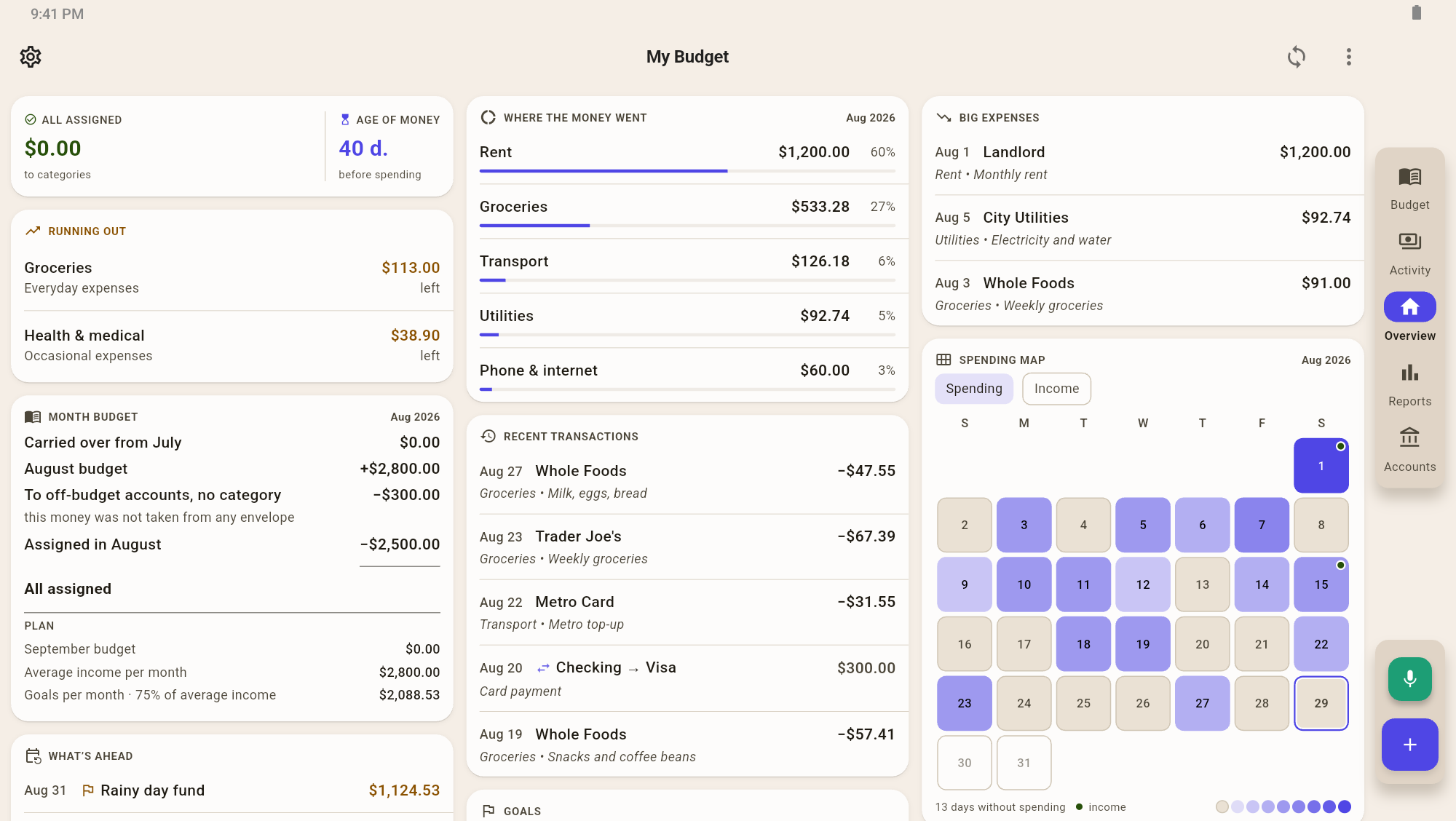
Envelope balances, progress bars and each category’s share of income.
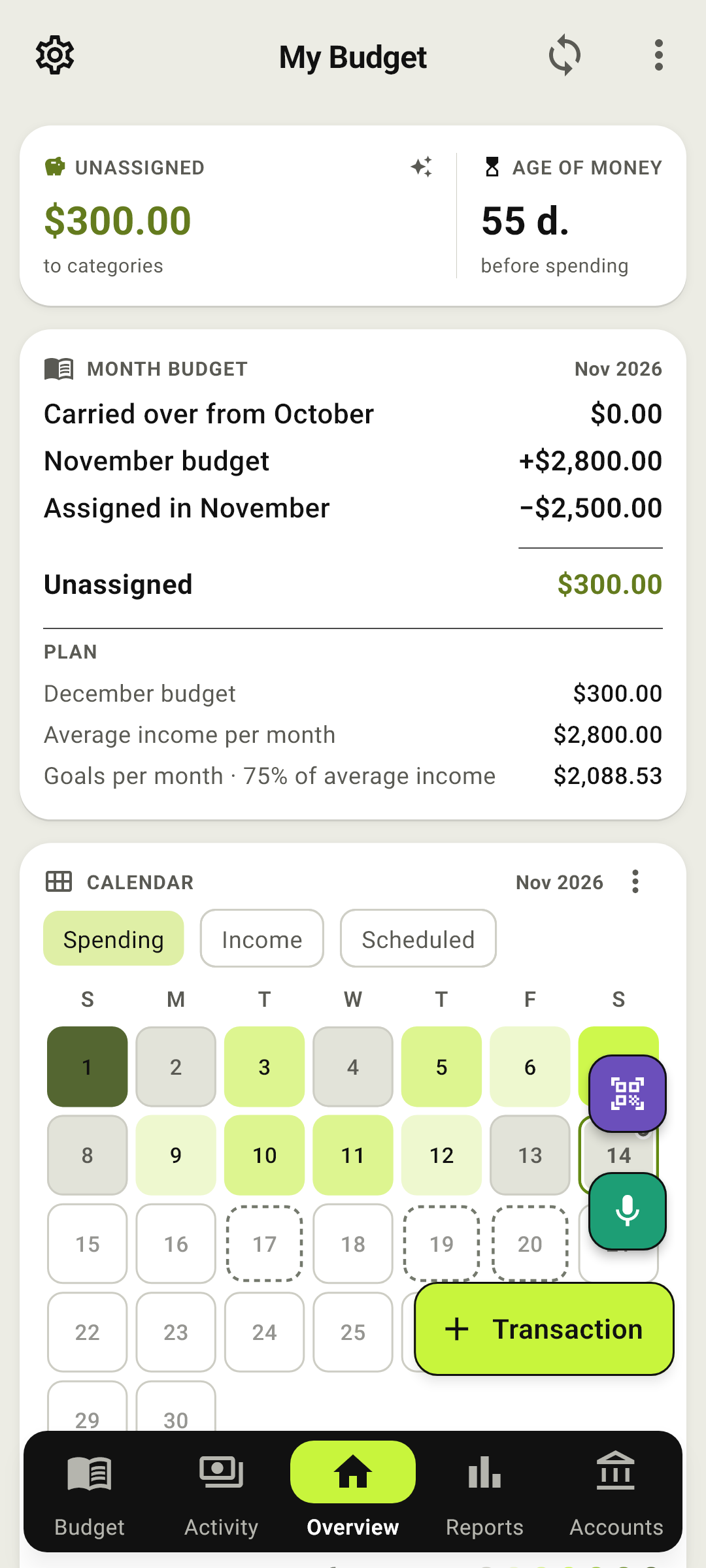
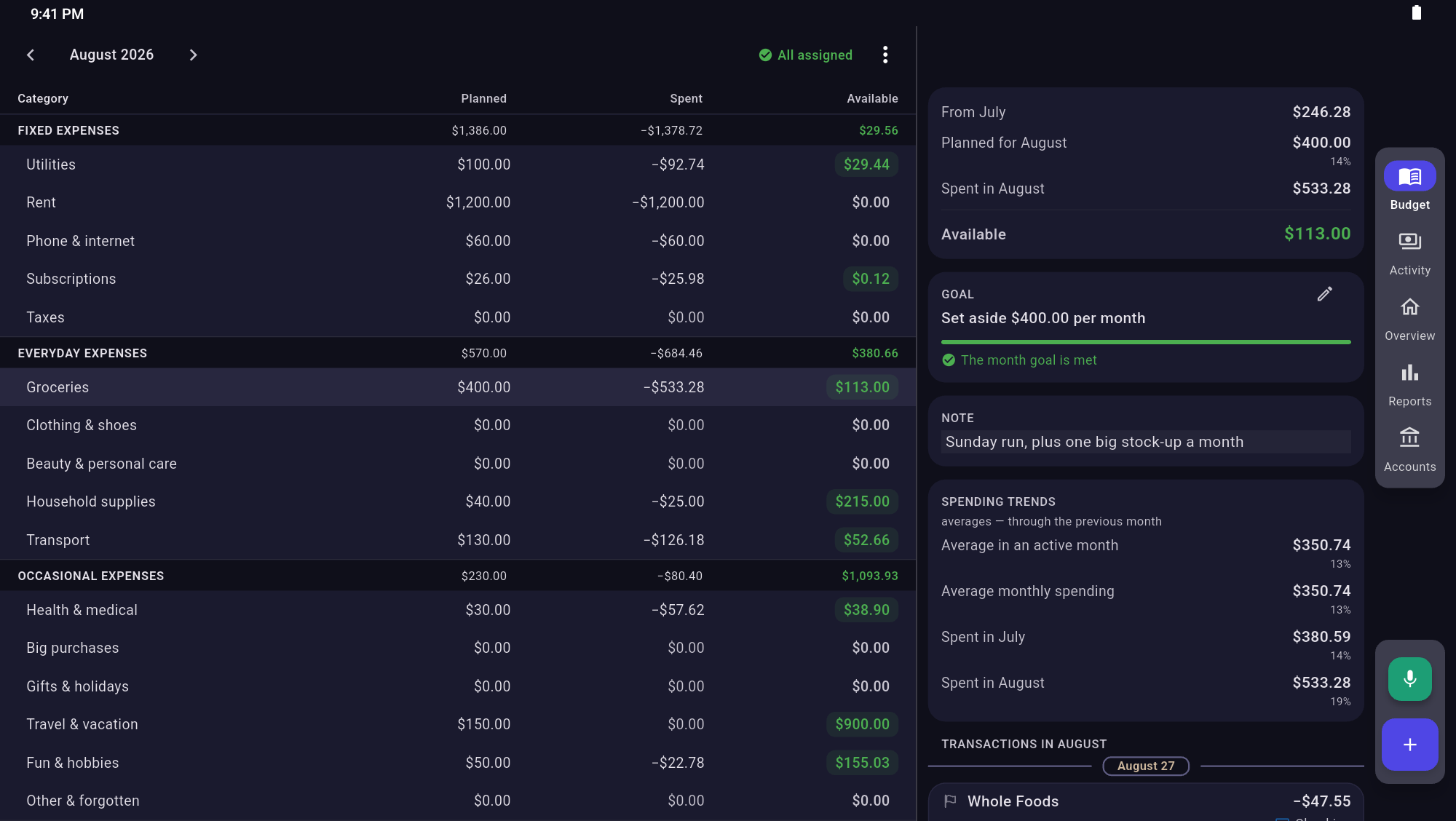
Month budget and calendar: money allocation and spending by day.
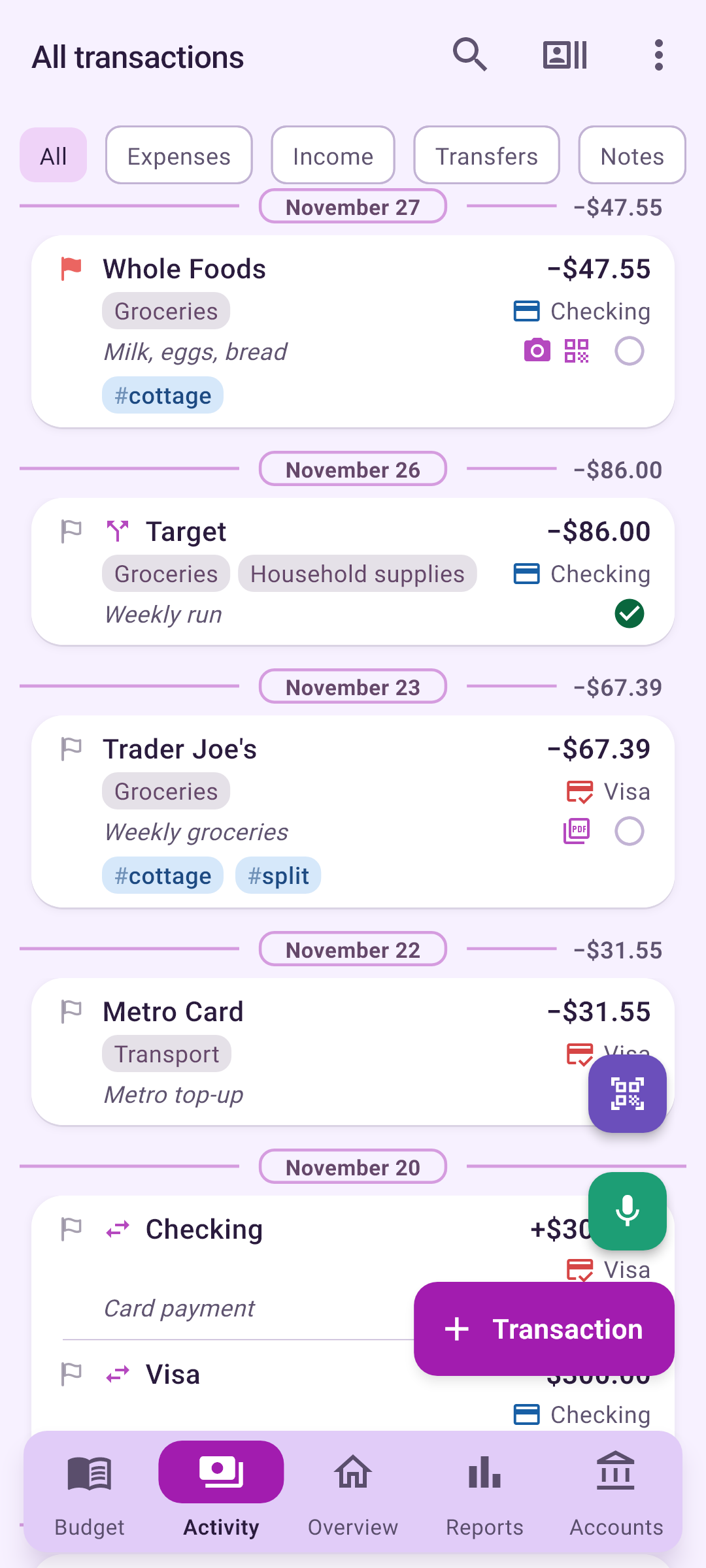
Purchases with categories and notes, a red flag and the day’s total beside the date.
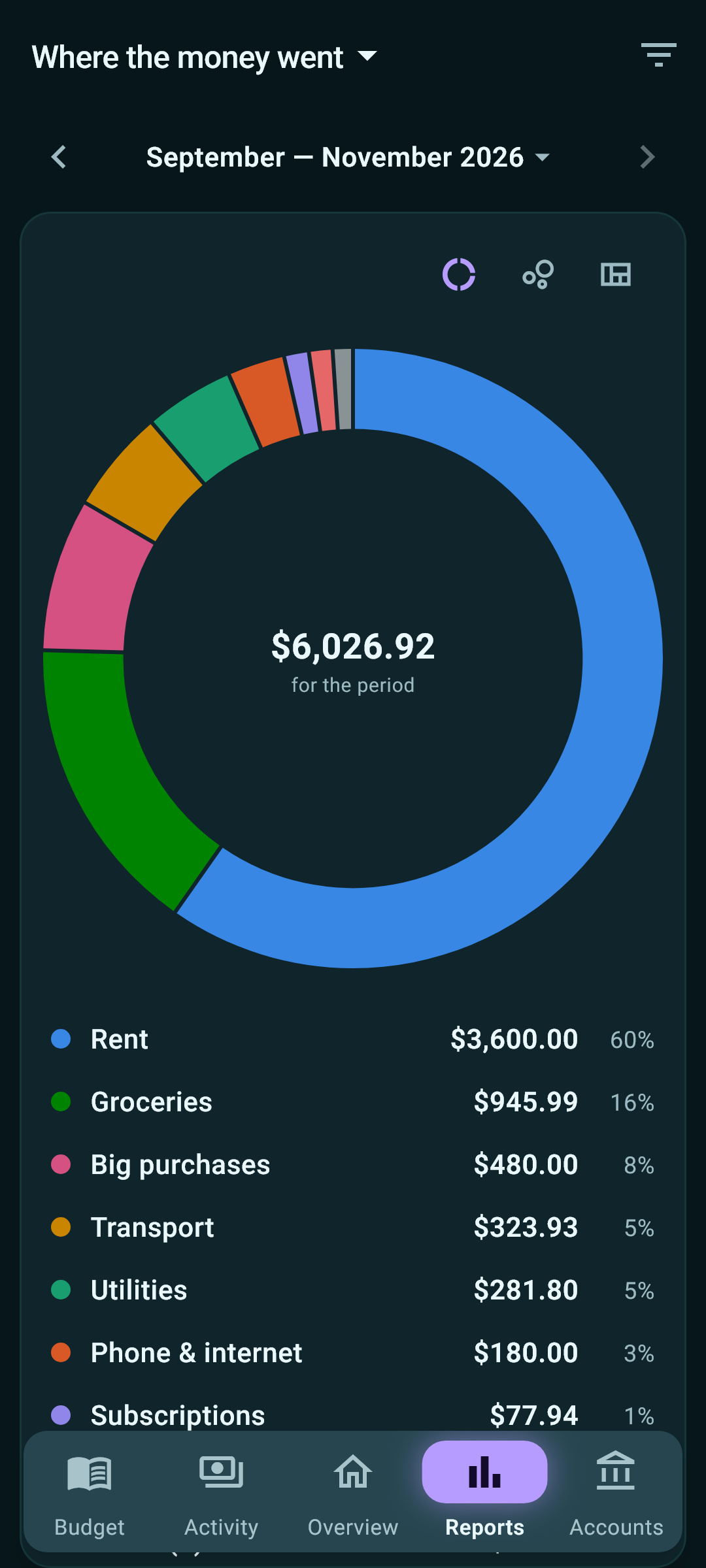
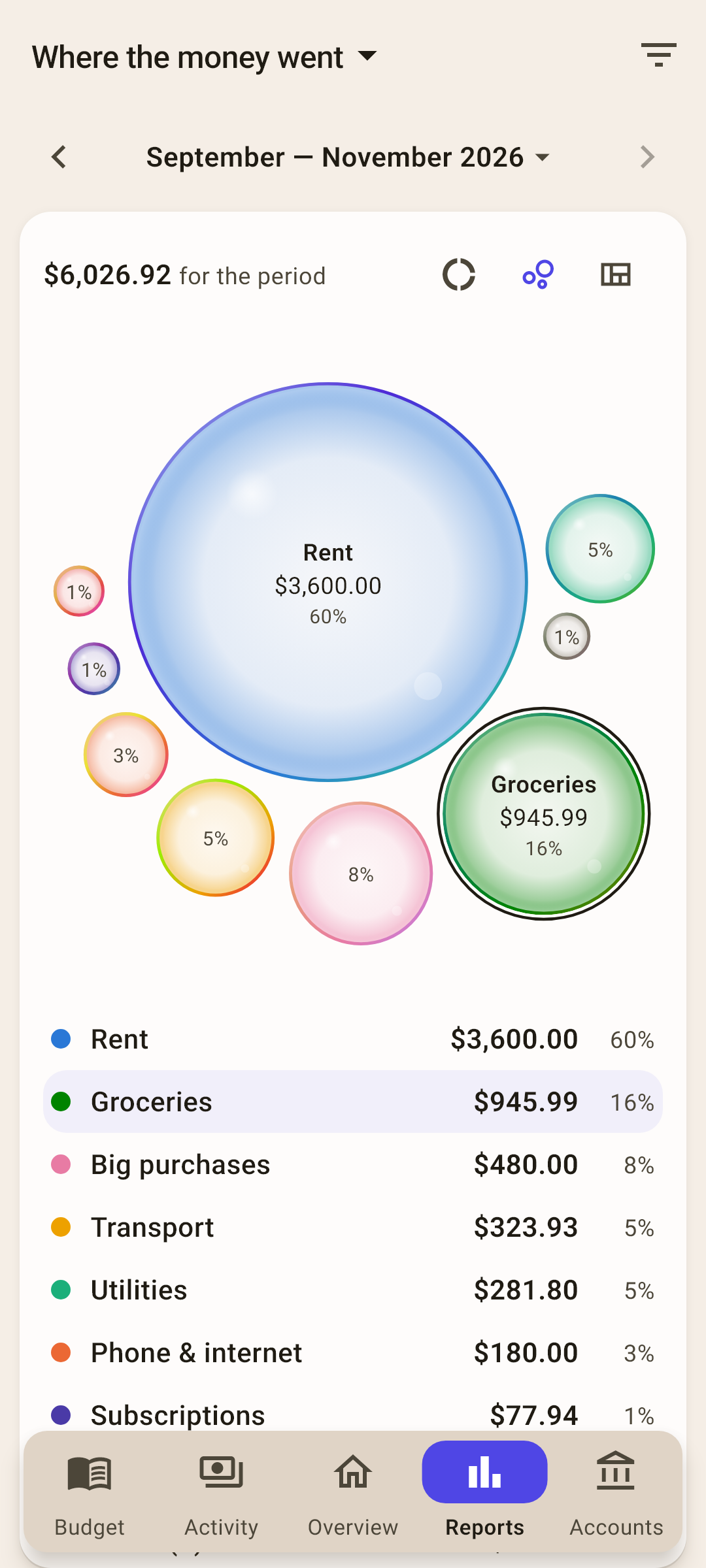
Spending by category: a doughnut chart, amounts and shares for the selected period.
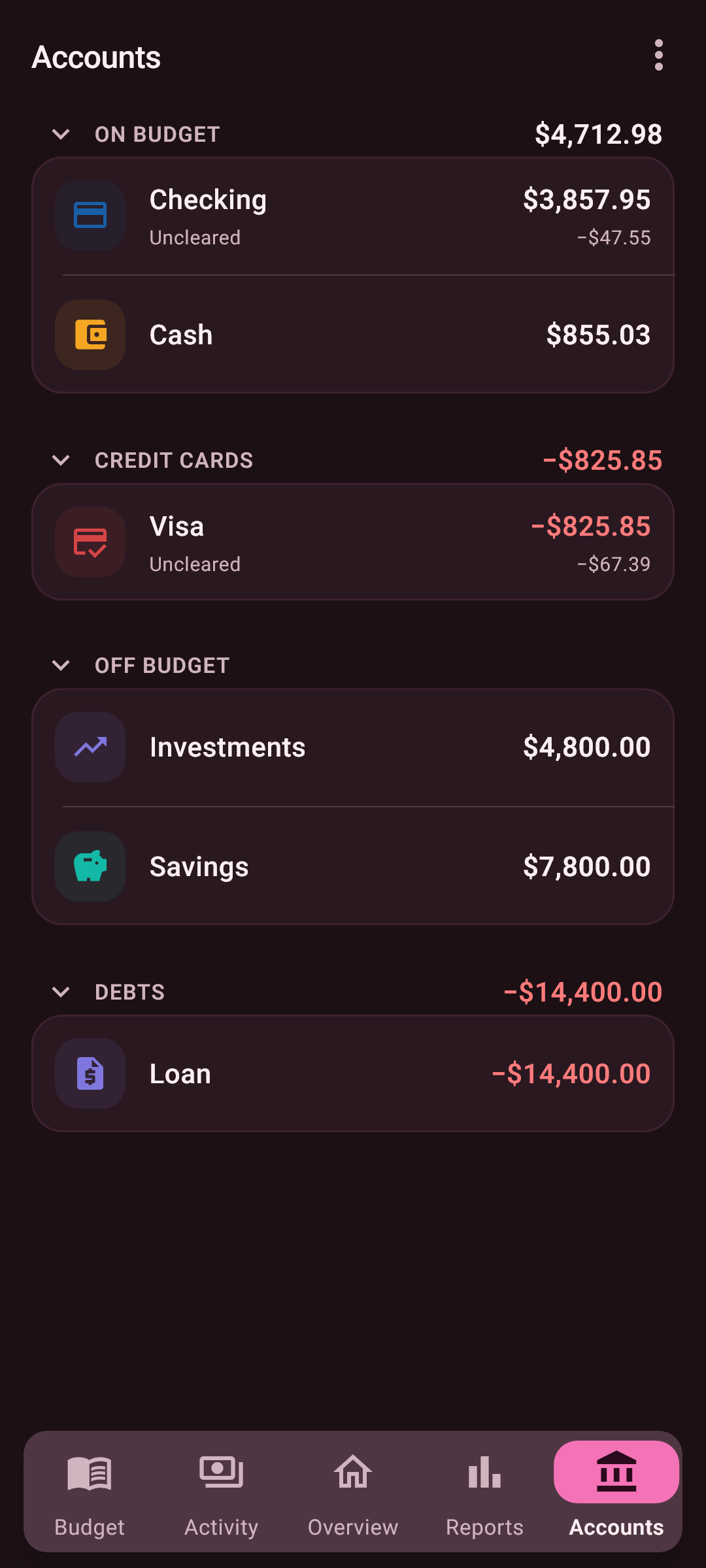
Accounts grouped by purpose: investments outside the budget and a loan under debts.
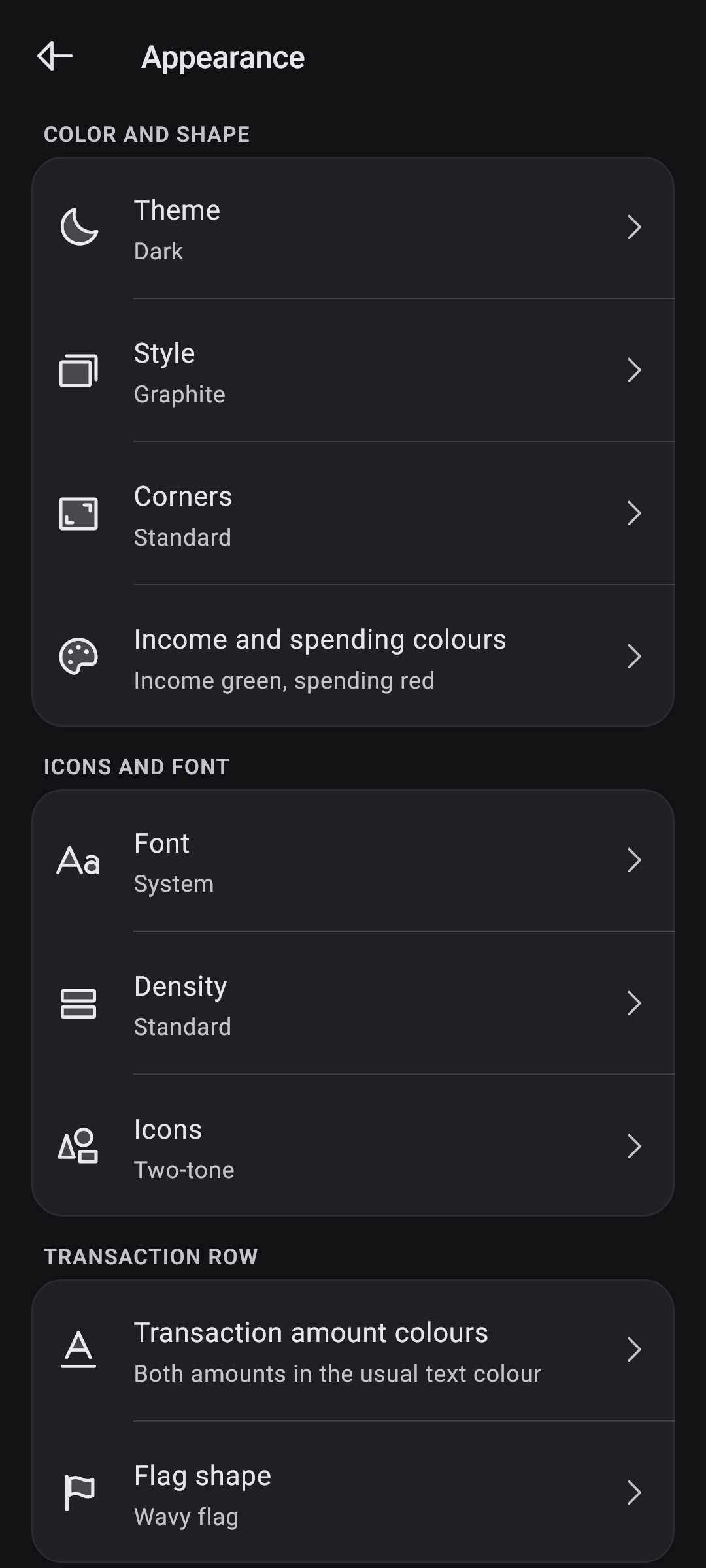
Appearance settings: dark theme, style, font and two-tone icons.
Your budget. Your character.
Seven styles are just the beginning. Change corners, icons, fonts and flags. Compare the same look in light and dark themes.
Mix any style, font and shape independently.
Interactive preview of app settings. These sample transactions do not change your practice budget.
03 / Your data stays yours
No account to create. No ads. Your budget belongs to you.
Privacy Policy ↗Everything the app sends to the cloud can be encrypted with a password you set - backups, receipt photos and the sync file alike. The password never leaves your device, and the format is documented in the privacy policy, so the files can be opened without this app.
04 / How to start
About five minutes. You can skip any step.
We filled in the currency from your country — check it. But give the budget a name of your own: that makes it easy to recognize on any of your devices.
Add every place your money is kept: cash in your wallet and cards at every bank — with today’s balance. Skip even one, and the budget won’t match what you actually have.
Decide how much of this money goes to each category this month: tap the amount next to a category. Start with the essentials — the rest can be assigned later on the «Budget» screen.
05 / Android + Windows
Record a purchase on Android. Plan your budget on Windows. Sync your phone and computer through your own Google Drive.
The Windows app is free to install from Microsoft Store.
It starts with your phone
Record a purchase at the checkout. Prepare for a big expense. Know what your money can cover. Envelopes connects everyday decisions with your plan.
Create categories and groups for bills, daily life and savings. Each shows its plan, spending and balance.
Assign money using goals, last month’s plan or spending, six-month averages, or percentage shares.
Move money between categories, cover overspending and carry your plan into the next month.
Set an amount and target month. The app calculates what you still need to set aside using your savings and time remaining.
Choose a monthly amount, a balance to maintain, or a percentage of the month’s income.
List what you need to buy or do in a category this month and enter the amounts — their total becomes the goal. Record an expense from a list item, or move purchases you have not yet recorded to another month.
Track category funding and use auto-assignment to top up underfunded goals.
Record the amount, date, account, category and payee. Notes keep the details you might otherwise forget.
Split a purchase into parts: groceries in one envelope, household supplies in another.
Use flags and tags to mark transactions. Day totals, search and filters help you check and find them.
Enable inbox mode to save an amount without completing the account and category. Unsorted entries stay in the queue.
Dictate a purchase, then check the recognised fields before saving.
Attach photos and PDFs to transactions so the supporting details stay close at hand.
Create future payments and income, and set a repeat schedule for recurring entries.
See upcoming payments in Overview and review due transactions in a separate list.
Set notifications to help you return to your budget and planned payments on time.
Tag transactions to see related income, expenses and statistics by category and month.
Mark a tag as a settlement. The difference between money spent and received shows who owes whom; a zero balance closes the settlement.
The Tags now overview block keeps current events and open settlements in view.
Include cash, bank accounts and credit cards in your budget. Track loans and other accounts outside it.
Record transfers between accounts and reconcile balances with the actual amounts.
Your budget uses its chosen currency. Off-budget accounts support separate currencies and greater precision; cross-currency transfers let you enter an exchange rate or the amount received.
Reorder or hide recent transactions, goals, net worth, large expenses, upcoming events and other overview blocks.
See the days when you spent more and the days when you spent nothing.
Track how much of your income you plan to assign to your chosen savings categories.
Compare categories and payees, find larger expenses and follow spending trends.
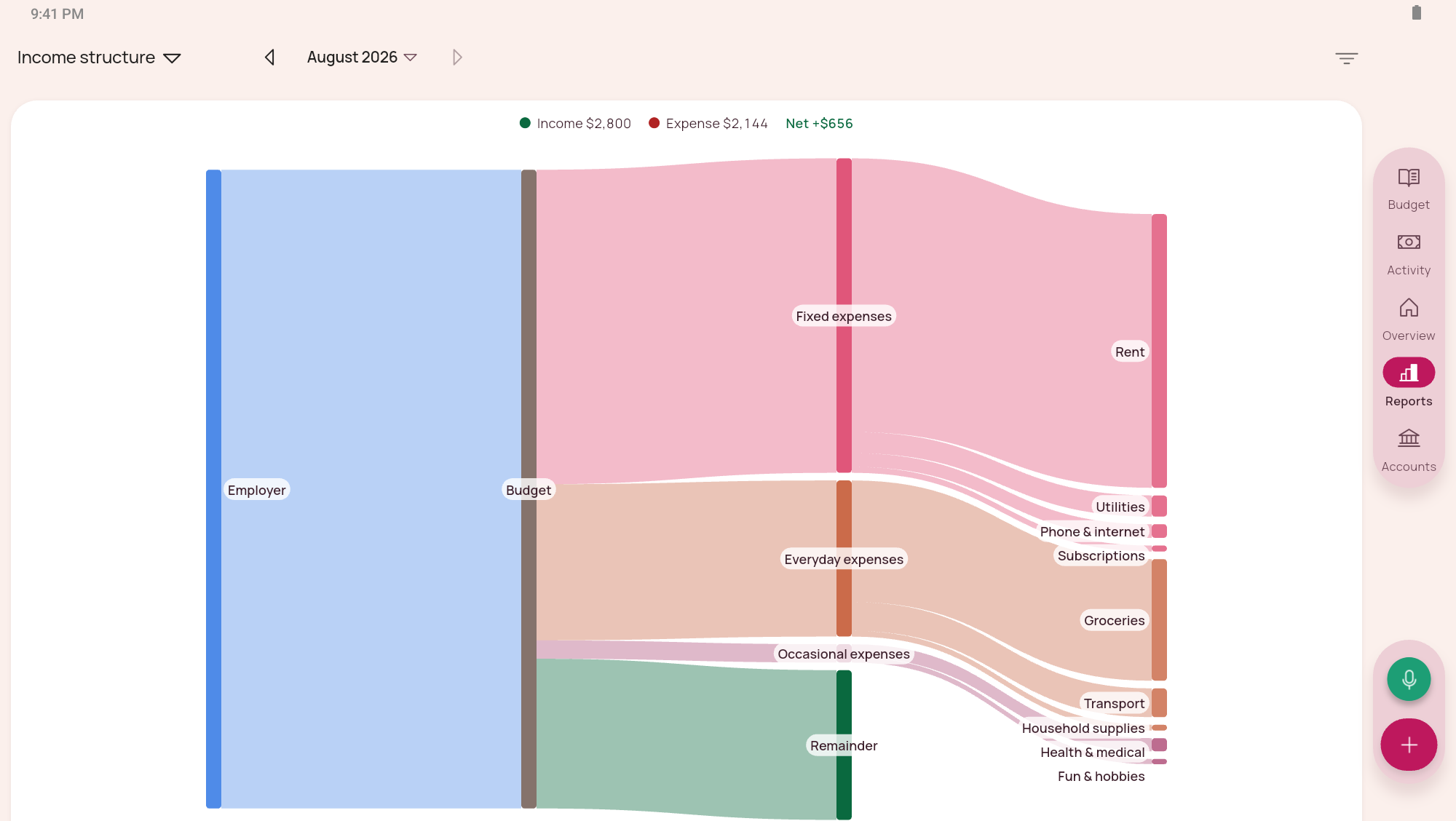
Explore income and spending in tables and charts. Choose a period and narrow the view with filters.
Follow net worth, credit card debt and age of money: the time between receiving money and spending it.
With enhanced colors enabled, reports use a dedicated palette for light and dark themes. The colors account for red–green color vision differences, making it easier to match the chart to its legend.
Combine seven styles with light or dark mode, and choose corners, icons, fonts and flag shapes.
Color income and expenses, income only, or keep amounts neutral. Flag-based row tinting can be switched off.
Enable enhanced colors to show income in blue instead of green, making it easier to distinguish from red expenses. This setting works in both light and dark themes.
Adjust density, number and date formats, and the first day of the week.
Manage your budget, record transactions and view reports without internet access. A connection is only needed for synchronisation and backups through cloud storage.
Connect your own Google Drive, Dropbox or WebDAV storage. Transfer a budget over Wi-Fi on the same local network.
Create budget backups and restore your data from them. Backups complement synchronisation.
Protect entry with a PIN and enable biometric unlocking on a supported device.
Import a YNAB 4 backup or web YNAB export files. Check accounts, transactions and balances after importing.
Export transactions to CSV to use them in a spreadsheet or keep a separate copy.
A Windows app is available when a larger screen suits the task. You can manage your everyday budget on your phone.
No. Create a budget on your device and start recording. An external storage account is only needed if you choose to connect cloud synchronisation.
Yes. You can manage your budget, record transactions and view reports without internet access. A connection is only needed for synchronisation and backups through cloud storage.
No. Everyday tracking, planning, goals and reports are available on Android. The Windows app is an optional companion for people who prefer working at a computer.
Add your accounts and their current balances, create a few categories and assign the money you already have. You do not have to reconstruct your entire spending history. The built-in setup guide helps with the first steps.
The plan starts with money you already have. When more income arrives, you can assign it to current expenses and future priorities. You do not need a fixed salary or a particular payday.
Move money from another category and adjust your plan. Auto-assignment can also cover overspending. Changing the plan does not remove purchases you have already recorded.
Yes. Split a transaction into parts and give each a category. Groceries and household supplies can stay on one receipt while being recorded against different envelopes.
Yes. Credit cards have a dedicated budget account type. Loans can be tracked in off-budget accounts. This lets you keep them alongside cash and bank accounts while preserving their different roles.
Yes. Set an amount and target month, and the app calculates what you still need to set aside. You can also choose monthly saving, a balance to maintain, a percentage of income, or a List goal based on the total of planned purchases in a category for the month.
Restore a backup or sync through your own Google Drive, Dropbox or WebDAV storage. Devices on the same local network can also transfer a budget over Wi-Fi.
Enable cloud encryption and set a password: the sync file, backups and receipt photos will be encrypted on your device before uploading. The provider receives encrypted files instead of readable budget data. Your password is sent neither to the cloud nor to the developer; use the same password on your other devices. Keep it somewhere safe — we cannot recover a forgotten password. This protection is optional and does not encrypt local files on your device.
No. Synchronisation helps transfer changes between devices, while a backup keeps a separate budget state that you can restore. The app supports both.
Yes. Set up a PIN to enter the app. Biometric unlocking is also available on supported devices.
Yes. Enhanced colors account for protanopia and deuteranopia, which affect red–green color discrimination. Income appears in blue instead of green, and reports use a dedicated palette with more distinguishable colors. The setting works in light and dark themes.
Yes. Import a YNAB 4 backup or web YNAB export files. Check accounts, transactions and balances after importing. This is a file import, not ongoing synchronisation with YNAB.
Yes. Export the current budget’s transactions to CSV to open them in a spreadsheet or keep a separate copy. Use a budget backup when you need to restore the budget.
The Windows version is free to install. Check Google Play for the current Android price and in-app purchase terms in your region.
Envelopes: My Budget
Start with the money you have. Build a budget that feels like you.
The Windows version is free to install. Check Google Play for the current Android price and in-app purchase terms in your region.